CivilTables (TableTools)
(Deprecated)
Product Details
Autodesk's Civil3D has the ability to generate various dynamic tables in the drawing. However this information cannot be extracted to other sources, such as MS Excel, Word, or output file formats (like CSV). This tool (exclusively for Civil3D) allows you to simply specify your target and pick the table to output.
The tables in Civil3D are not standard CAD tables, meaning you cannot use the CAD data extraction tools. Copy to clipboard and pasting into an application results in an image that (while better than nothing) will not allow data extraction by other applications.
This means you can now instantly copy the content of Civil3D tables to the target format or application. Simply choose the output option, select the civil table and it appears in the target application (or a file if an output format was chosen).
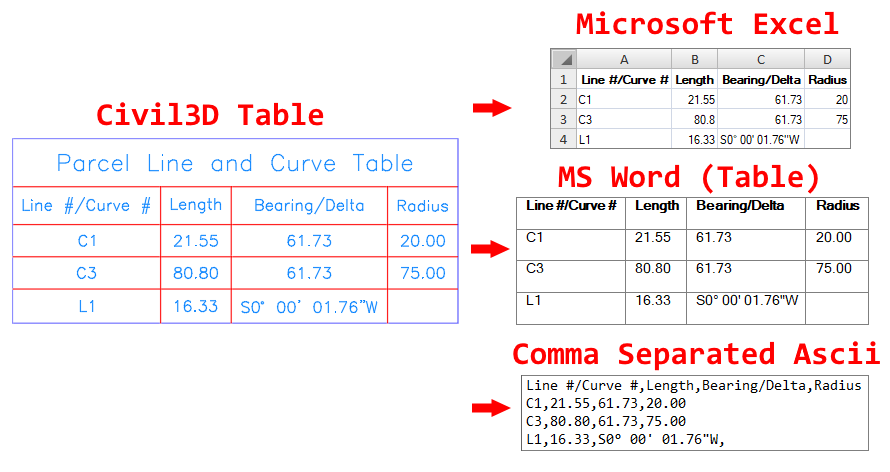
Look for the Civil Tables functionality under the Mapworks for Civil3D -- Tools -- Table Output (GenTblOut)!
Requires (one of the following):
- Civil3D 2025-2026 Based Products
- Civil3D 2018-2024 Based Products
- Civil3D 2015-2017 Based Products
Note: As a deprecated product, technical support for previous versions of CivilTables is still available but product improvements and bugfixes will only continue in Mapworks.
Documentation: Installs with the software and is available on-line.
Purchase: As part of C3DTools (MapWorks).
Product Support: Email Support Only: Contact us!
Upgrade Pricing: Contact us for discounted upgrade pricing.